Word Search
Game information
- Published
- Last updated
- Technology
- Iframe
- Categories
- Puzzle Games
Related games







Game info
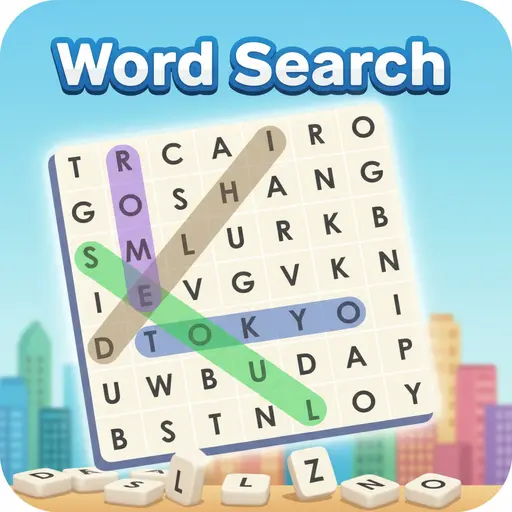
Play Word Search online for free, the ultimate puzzle game that tests your vocabulary and observation skills! Can you find all the hidden words before the timer runs out? This classic brain-teaser is super easy to start but gets trickier as you level up. With simple tap-and-drag controls, anyone can jump in and start hunting for words instantly on any device.
Boost your brainpower and improve your spelling while collecting points and beating high scores. Whether you're playing on a phone, tablet, or computer, Word Search is packed with exciting themes like animals, food, sports, and more to keep the fun going. Every puzzle offers a fresh challenge to keep you entertained for hours.
Are you ready to spot the hidden words and become the ultimate puzzle master?
About Word Search
Word Search is a timeless puzzle game where players must locate a list of words hidden inside a grid of scrambled letters. It was first released in June 2018 as a digital browser game and has since become a staple for puzzle lovers everywhere.
The game was created by MarketJS, a leading developer known for creating high-quality, mobile-friendly HTML5 games. Whether you're playing on a desktop, tablet, or mobile phone, Word Search is designed to run smoothly with a clean interface that puts the focus entirely on the fun of solving puzzles.
Thanks to its endless replayability and variety of categories, Word Search continues to be a favorite choice for kids and players of all ages who love testing their logic and expanding their vocabulary!
Word Search Gameplay
Word Search is easy to learn but hard to master! You start with a small grid and a short list of words to find. Your main goal is to spot every word listed at the bottom of the screen hidden within the jumbled letters. You need sharp eyes and quick thinking to spot words that can be arranged horizontally, vertically, or diagonally.
As you keep playing, the game increases in difficulty with larger grids and more complex words. Some versions feature a timer to add a rush of adrenaline, while others offer a relaxed mode. What makes this game unique is its huge variety of themes, ensuring you never play the exact same puzzle twice.
The gameplay mechanics are straightforward: simply swipe or drag your finger (or mouse) over the letters to highlight them. When you successfully find a word, it gets crossed off your list. Improving your speed can help you earn three stars on every level, proving your mastery of the grid.
Advanced players will face grids where words are spelled backward or overlap with each other, creating a real mental workout. The connection between your observation skills and your success is tight—the more you play, the faster you will recognize patterns and clear the board.
Platform
You can play this game directly in your web browser, whether you're using a desktop, laptop, tablet, or mobile device.
How to Play Word Search?
In Word Search, your main goal is to clear the board by finding every single word listed in the inventory. You must scan the grid of letters carefully to find the correct sequences. The main challenge is finding words that are hidden backward or diagonally, which can be tricky to spot.
To succeed, look at the first letter of the word you are hunting for and scan the grid for that character. Once found, check the surrounding letters to see if they match. If you find all the words, you win the level and unlock the next challenge! However, if you are playing in timed mode and the clock hits zero before you finish, you may have to restart the level.
The game ends when all puzzles in a category are solved, or when you complete the daily challenge. Your score is often based on how quickly you found the words, giving you plenty of motivation to replay levels and beat your own best times.
Controls
Word Search uses simple and intuitive controls that work perfectly on any screen. Here's how you control the game:
- On Computer:
- Click and hold the Left Mouse Button on the first letter of a word.
- Drag the cursor to the last letter of the word and release to highlight it.
- On Mobile:
- Touch the first letter with your finger.
- Slide your finger to the end of the word and lift to select it.
These controls are super responsive, making it easy to swipe through words quickly as soon as you spot them.
Tips and Tricks for Word Search
Want to solve puzzles faster in Word Search? These simple and helpful tips will improve your observation skills and help you unlock cool rewards:
- Scan for Rare Letters: Look for letters like Q, X, Z, or J first, as they are easier to spot in the grid.
- Check the First Letter: Pick a word from the list and find every instance of its first letter on the board.
- Read Backwards: Don't forget that words can be written in reverse; train your eyes to read right-to-left.
- Look for Diagonals: Many words are hidden diagonally, so scan the board at an angle.
- Group Similar Words: If you have a category like "Fruits," keep your mind focused on fruit names to recognize them faster.
- Use the Highlight: Sometimes highlighting a word you think you see helps reveal if it's correct even if you aren't 100% sure.
- Row by Row: Scan the grid row by row or column by column systematically so you don't miss anything.
- Take Breaks: If you are stuck, look away for a second and look back; a fresh perspective often reveals the missing word.
Follow these tips and you'll be clearing grids and earning high scores in no time!
Features of Word Search
Word Search is a fantastic brain-training game designed for players of all ages. Below are the top features that make this game so enjoyable and addictive:
- Multiple Categories: Choose from dozens of themes like Animals, Food, Sports, and Countries to keep the game fresh.
- Daily Challenges: Play a unique puzzle every day to earn special rewards and keep your streak alive.
- Difficulty Levels: Start with easy 5x5 grids and work your way up to massive, complex boards for experts.
- Clean Graphics: Enjoy a bright, colorful, and distraction-free interface that makes reading letters easy.
- Available in Multiple Languages: Practice your vocabulary in English, Spanish, French, German, and more.
- Hint System: Stuck on a hard word? Use a hint to reveal the location of a letter or word.
- Timer Modes: Challenge yourself against the clock or play in relaxed mode for a stress-free experience.
- Star Rating System: Earn up to three stars per level based on your speed and accuracy.
These features make Word Search a perfect game for anyone who loves relaxing puzzles and mental challenges!
Game Details
| Developer | MarketJS |
|---|---|
| Release Date | June 2018 |
| Genre | Puzzle / Word Game |
| Platform | Web Browser, Mobile, Tablet |
| Mode | Single-player |
Word Search Online
Word Search online is the special version of the popular puzzle classic that you can play right here on our website. This version has been carefully designed so that you can enjoy the game directly in your browser—without downloading or installing anything!
You can start playing Word Search instantly with just one click. It works smoothly on all major web browsers, including Google Chrome, Mozilla Firefox, Microsoft Edge, Safari, and Opera. Whether you're using a computer, tablet, or mobile phone, the game is fully optimized for your device.
This is a modified edition of the original Word Search, made for the best online experience. It keeps all the fun gameplay while running fast and safely on every browser.
Word Search for Free
You can enjoy playing Word Search for free right here on our website. This is a special modified version of the original game that allows you to play online without paying anything. No download is needed, and there are no hidden fees or in-game purchases.
Everything in the game—from the different themed categories to the daily challenges—is completely free. Kids and players of all ages can have fun without spending a single coin!
Also, all the games on our site are 100% free to play. We believe in fun gaming without limits or costs. Just choose a game and start playing instantly!
Can You Play Word Search Unblocked?
Yes! You can play Word Search unblocked anytime on our website Super bear Adventure. Whether you're at school, in class, at work, or on a break, the game runs smoothly without any restrictions.
There's no need to download anything or bypass any blocks. Just visit our site and start hunting for words right away. It's safe, fast, and works perfectly on any device!
- Unblocked Games 76: A popular site that offers a large variety of unblocked games, including Word Search’s clean and engaging gameplay.
- Unblocked Games G+: Another great destination for games that are often blocked on school networks. Word Search is featured for quick, logic‑based fun.
- Unblocked Games 6x: Offers safe, kid‑friendly titles. Word Search fits perfectly with its puzzle and logic focus.
- Unblocked Games 66: Known for its extensive collection of accessible games. Word Search is available for unblocked play, letting you test your skills wherever you are.
- Unblocked Games 67: Provides no-download, in‑browser games. Word Search appears in the puzzle section.
- Unblocked Games 77: A robust selection of unblocked games, letting you enjoy Word Search’s engaging platform for quick challenges.
Word Search GitHub
Many players search for Word Search GitHub versions to bypass blocks that prevent them from playing the game at school or work. While GitHub might offer some alternatives, it's often complicated and not always reliable.
But with our website Super bear Adventure , you don't need to search for GitHub versions anymore. Our version of Word Search runs smoothly on all devices and networks. Whether you're in the classroom, office, or on a break — enjoy the full game online with no restrictions, no downloads, and completely for free!
Word Search Download
Many fans of Word Search love to download the game to their own devices for a better playing experience than just playing on the browser. Here's how you can do it:
- If your device runs on Android, just go to the Google Play Store and tap the install button to download the game.
- If you use Apple devices like iPhone or iPad, head to the Apple App Store and press the install button to get the game.
APK Word Search
If you use an Android device but can't find the game in the Google Play Store, don't worry! You can search for the Word Search APK file online and download it directly to your device. This way, you can install the game without using Google Play.
Also, if you love playing on your computer, you can download Word Search for free from the Steam store. This lets you enjoy the game with better controls and graphics.
Word Search Extension
Many fans of Word Search prefer to play the game directly on their browser using a Google Chrome extension. This lets them start playing instantly without having to visit the website every time. Plus, some extensions allow you to play offline whenever you want. To download the Word Search extension, click here.
Similar Games to Word Search
Find More Games by Category
Frequently Asked Questions (FAQ) About Word Search
What is Word Search?
Word Search is a puzzle game where you need to find a list of specific words hidden in a grid of scrambled letters.How do I play Word Search?
Use the mouse or touch controls to click (or tap) on the first letter of a word, drag to the last letter, and release to create a line highlighting it.Is the game free?
Yes, Word Search is free and accessible directly in the browser.On which platforms can I play?
The game is available on Web Browsers, Android, and iOS devices.Do I need an account to play?
No, you can start immediately without an account.Is the game suitable for children?
Yes, Word Search is designed for all ages and features kid-friendly graphics and themes.Are there difficulty levels?
Yes, the game offers Easy, Medium, and Hard modes which change the grid size and word complexity.How do I progress to the next level?
You need to find all the words listed on the screen to move to the next level.Can I replay a level?
Yes, you can replay categories or levels to try and beat your previous time score.Is the game multiplayer?
No, Word Search is typically a solo game played against yourself or a timer.Are there any tips for success?
Scan the board for double letters or uncommon letters like 'Q' and 'Z' to find words faster.How can I improve my skills in the game?
Practice regularly, learn to read backwards and diagonally, and focus on one word at a time.What do I do if the game is lagging or crashing?
Try clearing your browser cache, updating your browser, or playing on a different device with a stable internet connection.Can I play without an internet connection?
No, this browser version requires an internet connection, though some app versions work offline.How do I earn rewards or bonuses?
You can earn stars or coins by completing levels quickly without using hints.What happens if I can't find a word?
You can use the "Hint" button if available, which will highlight the first letter of a hidden word.How often does the game get updated?
The game receives updates occasionally to add new word categories and seasonal themes.Can I customize the game?
You can often change the background theme or the color of the highlighter marker in the settings menu.How do I unlock new categories?
New categories are usually unlocked by completing the initial easy levels or by watching a short ad.Is there any way to save my progress?
Yes, your progress is automatically saved through your browser’s local storage.
Does playing Word Search help my brain?
Yes, playing word puzzles helps improve vocabulary, spelling, and pattern recognition skills.
Can I play in different languages?
Yes, most versions of the game allow you to switch between English, Spanish, French, and other languages in the settings.
Is there a time limit?
It depends on the mode you choose; "Timed Mode" has a countdown, while "Relaxed Mode" lets you play at your own pace.
Can words be spelled backwards?
Yes, words can appear horizontally, vertically, diagonally, and even backwards.
What is the hardest difficulty?
The hardest difficulty usually involves a very large grid with words that are long, obscure, or spelled backwards.
Are the puzzles the same every time?
No, the game randomly generates the grid layout each time you play, so the experience is always fresh.
Can I turn off the sound effects?
Yes, there is a settings icon on the main menu where you can toggle music and sound effects on or off.
Does this game work on an iPad?
Absolutely, the game is fully touch-optimized and works great on iPads and Android tablets.
How many words are in one puzzle?
Easy puzzles might have 5-8 words, while hard puzzles can have 20 or more words to find.
Is there a dark mode?
Some versions of the game include a "Night Mode" or dark theme to reduce eye strain.
Can I pause the game?
Yes, you can pause the game at any time, which stops the timer until you are ready to resume.
What are daily challenges?
Daily challenges are special puzzles released every 24 hours that are often harder than standard levels.
Do I need a keyboard to play?
No, you only need a mouse or a touchscreen; a keyboard is not required.
Is this game educational?
Yes, teachers often recommend Word Search games to help students learn new words and improve spelling.
How do I restart the game?
You can refresh the browser page or click the "Restart" button in the pause menu to start the level over.
Conclusion
Word Search is an excellent game for sharpening your mind while having a relaxing time. It combines the fun of gaming with the educational benefits of vocabulary building and pattern recognition, making it a smart choice for school breaks or downtime. With its easy-to-use interface and colorful themes, it’s accessible to everyone.
Since it works on phones, tablets, and computers without any downloads, you can take the fun with you wherever you go. Whether you are 7 or 18, the satisfaction of clearing the board and beating your best time never gets old. Plus, playing for free means the only investment is your time!
So, why wait? Click play now and see how many words you can find! Challenge your friends to see who can solve the puzzle the fastest and become the ultimate Word Search champion!
🎮 More Free Puzzle Games
Browse all Puzzle Games (77) →Looking for more games like Word Search? Explore top-rated unblocked games in our Puzzle Games collection: